How to Get GitHub Education Benefits
Written by Sumit Poudel on January 1, 2026
How to Get GitHub Education Benefits: A Comprehensive Guide 🎓
As a student, accessing professional development tools can be financially challenging. Industry-standard IDEs, cloud hosting, and design software often cost hundreds or even thousands of dollars annually. The GitHub Student Developer Pack removes these barriers by providing students with free access to over professional developer tools and services.
This comprehensive guide will walk you through the eligibility requirements and application process, helping you unlock these valuable resources to accelerate your learning and build impressive projects.
Once approved, you’ll gain access to an extensive collection of free tools and services:
Development Tools
- GitHub Pro: Unlimited private repositories, advanced code review tools, GitHub Copilot access, and GitHub Actions minutes while you’re a student
- JetBrains: Free access to professional IDEs including IntelliJ IDEA, PyCharm, WebStorm, and more
- GitKraken: Git GUI client with enhanced features for managing repositories
Cloud & Hosting Services
- Microsoft Azure: $100 in credits plus free access to 25+ cloud services
- DigitalOcean: $200 in platform credits for cloud hosting (valid for 1 year)
- Heroku: Free dyno hours for hosting web applications
- MongoDB Atlas: Free database hosting with advanced features
Domain & Security
- Namecheap: One year of free domain registration (.me domain) plus SSL certificate
- Name.com: Free domain name registration for one year
Design & Productivity
- Canva: 12 months of Canva Pro for creating professional designs and presentations
- Figma: Free professional design tools for students
Learning Resources
- DataCamp: 3 months of free access to data science courses
- FrontendMasters: 6 months free access to premium web development courses
Note: The specific benefits, dollar amounts, and duration may change over time as partners update their offerings. Check the official GitHub Education page for the most current list.
1. Prerequisites: What You Need Before Applying ✅
Before starting the application process, gather the following items:
Pro Tip: Using your mobile phone for the application process is recommended for easier photo uploads and location sharing.
Required Items:
-
A GitHub Account: Create one at github.com/signup if you don’t already have an account. Ensure your profile name and address match the details on your student ID card exactly.
-
Current Academic Enrollment: You must be actively enrolled in an Officially recognized degree or diploma program (high school, secondary school, college, university, bootcamp, or similar educational institution).
-
School-Issued Email Address: An institutional email (typically ending in .edu, .edu.np, or your school’s specific domain like studentname@university.edu.np) provides the easiest verification path. If you don’t have a school email, contact your institution’s IT department or academic advisor to request one—most institutions provide these to enrolled students.
-
Proof of Current Enrollment: You’ll need to upload valid documentation showing your current enrollment status and enrollment date. Acceptable documents include:
- Student ID card with expiration date
- Official transcript showing current semester
- Enrollment verification letter from your institution
- Student portals
Important: Your proof must show you are currently enrolled, not that you were enrolled in the past.
2. Step-by-Step Application Process 📝
Follow these steps carefully to maximize your chances of approval:
Step 1: Update Your GitHub Profile
Ensure your GitHub profile information matches your student documentation exactly:
- Visit your GitHub profile settings
- Update your full name to match your student ID
- Add your current location (city and country)
- Add your school email at github.com/settings/emails
- Verify your school email by clicking the link GitHub sends
Why this matters: GitHub uses this information to verify your identity and academic affiliation.
Step 2: Complete Billing Information
Navigate to the Billing Information Page.
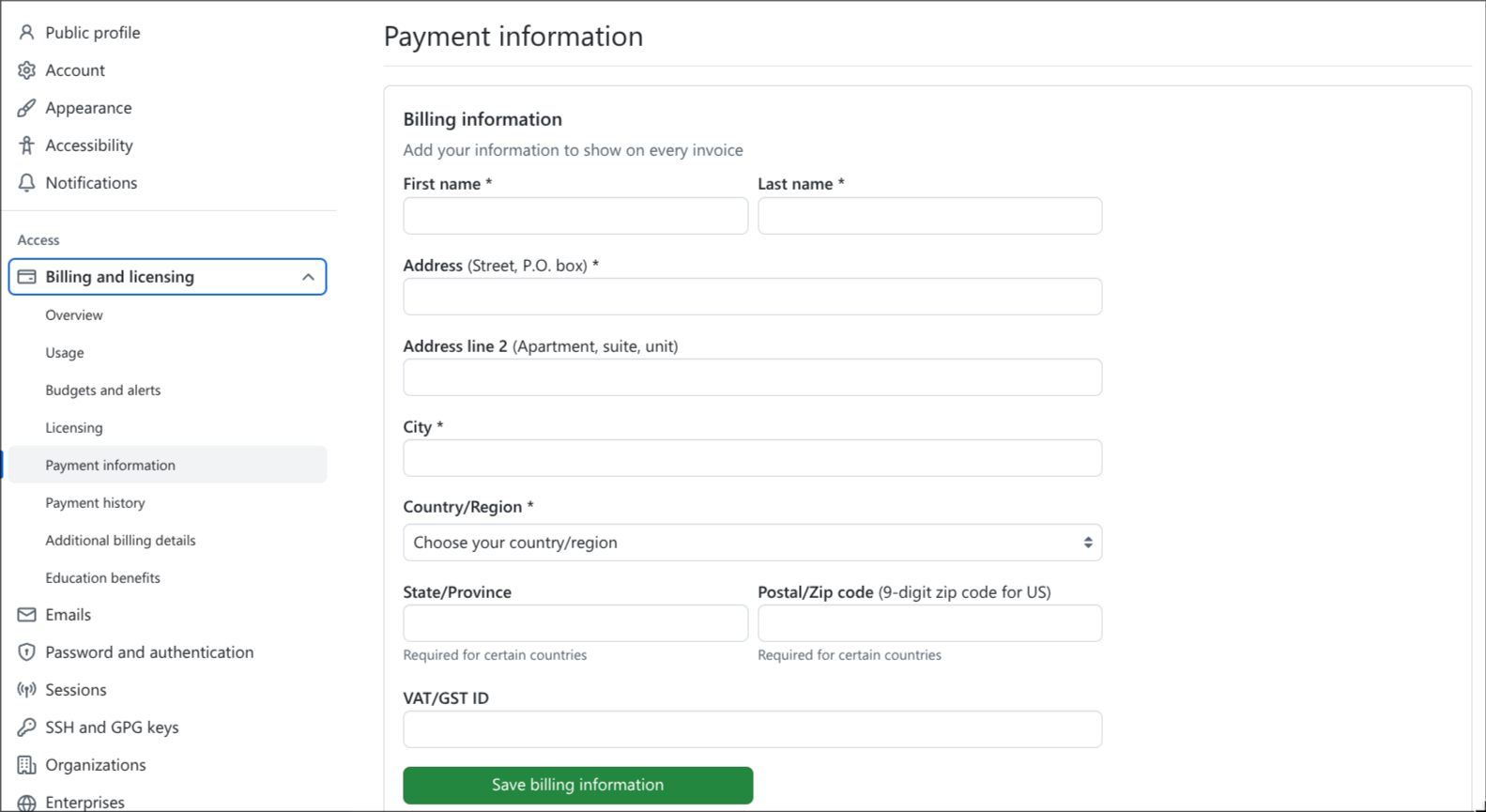
Fill in your payment information with the same name and address from your GitHub profile and student ID.
Why billing info for free benefits? GitHub uses this information to verify your identity and location—you won’t be charged anything. This step helps prevent fraud and ensures benefits go to legitimate students.
Recommendation: After completing this form, log out of GitHub and log back in before proceeding. This ensures all your information is properly saved in GitHub’s system.
Step 3: Start Your Education Benefits Application
Go to the GitHub Education Benefits Page.
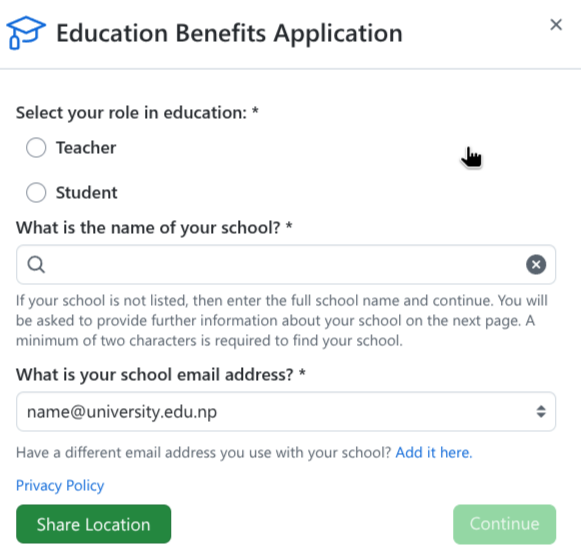
Follow these steps in order:
- Click the “Start an application” button
- Select your role as “Student”
- Search for and select your school from the institution list
- Choose your verified school email from the dropdown menu
- Click “Share location” when prompted (this helps verify you’re near your institution)
- Describe how you plan to use GitHub (be specific: mention projects, coursework, or learning goals)
Note: If your institution isn’t listed, you can add it manually by entering the school name.”
Important Note on School Name: Use your actual college or campus name rather than the affiliated university name. For example:
Use “Birendra Multiple Campus” instead of “Tribhuvan University”
Step 4: Upload Proof of Academic Status
Upload a clear, high-resolution image of your proof of enrollment.
Document Requirements:
- Must show your full name (matching your GitHub profile)
- Must show current academic year or semester
- Must show an expiration date or enrollment date proving current status
- All text must be clearly legible
For Non-English Calendars: If your institution uses B.S. (Bikram Sambat), Nepali calendar, or another calendar system, create a side-by-side image showing:
- Your original document
- A date conversion showing the equivalent year (use an online converter)
This helps GitHub reviewers understand that your enrollment is current.
Pro Tip: Take the photo in good lighting against a dark background. Avoid shadows and ensure all corners of the document are visible.
Step 5: Submit and Wait for Approval
After clicking submit, you’ll receive a confirmation screen.
Approval Timeline:
- With .edu or .edu.np email: Often approved within 24-48 hours
- Without school email domain: May take 3-7 business days for manual review
- After approval: Benefits activate within 72 hours (3 days)
You’ll receive an email notification once your application is approved. Check your GitHub Education dashboard to confirm your benefits are active.
3. Common Issues and Troubleshooting ⚠️
If your application is rejected, review these common issues:
Issue: “We were unable to verify your academic affiliation”
Solutions:
- Ensure your uploaded document is high resolution and all text is clearly readable
- Verify your name on the document matches your GitHub profile exactly (including middle names or initials)
- Make sure the document shows current enrollment, not past enrollment
- If your student ID doesn’t have an expiration date, upload two documents side by side: your student ID + a current transcript or enrollment letter
How to combine documents: Place the two documents side by side in a frame before capturing and uploading.
Issue: Application pending for over 2 weeks
Solutions:
- Check if GitHub requested additional information via email
- Respond promptly to any verification requests
- If no response after 2 weeks, contact GitHub Education Support
Need More Help? Browse similar issues and solutions in the GitHub Education Community Discussions.
4. Maintaining Your Benefits 🔄
Renewal Requirements
- GitHub Student benefits last 2 years from approval
- You’ll need to reapply with updated proof of enrollment when your benefits expire
After Graduation
- Your benefits will expire according to the end date shown in your Education dashboard
5. Conclusion
The GitHub Student Developer Pack provides an unparalleled opportunity for students to access professional-grade tools that would otherwise be financially out of reach. From cloud hosting to premium IDEs and design software, these resources enable you to build real-world projects, develop professional skills, and create an impressive portfolio—all without financial barriers.
Ready to apply? Start your application at education/benefits.
Have questions or need help with your application? Drop a comment below. Good luck with your application! 🚀