Agentic Development with Claude Code: Build and Ship a Full-Stack App with Stitch, Supabase, Vercel, Cloudflare and Resend
Written by Siddanta Sodari on October 7, 2026
Introduction
For most of my time writing code, “using AI” meant copying a snippet out of a chat window and pasting it into my editor. That works, but the AI never sees your database, your deployments, your logs or your design files. You end up acting as a slow, error-prone copy-paste bridge between the model and your tools.
Agentic development removes that bridge. Instead of asking for snippets, you give an agent (here, Claude Code) a goal. It can then read your repo, run commands, call your cloud services and check its own work. You review its plan, approve the risky steps and make the decisions. The agent does the typing, clicking and log-reading.
The glue that makes this possible is the Model Context Protocol (MCP), an open standard that lets Claude call tools exposed by other services. Once Stitch, Supabase, Vercel, Cloudflare and Resend are connected over MCP, one terminal session can design a page, create a database table with row-level security, deploy a preview and read the production logs.
In this guide we build TaskFlow, a small but production-shaped team task manager:
- a landing page with a waitlist form (bot-protected, rate-limited, sends a welcome email),
- magic-link sign in, and every new user automatically gets a workspace,
- a realtime, drag-and-drop task board (changes show up live for every teammate),
- a weekly email digest sent by a scheduled job,
- unit tests, end-to-end tests and CI, plus Claude reviewing your pull requests on GitHub,
- deployed on a custom domain, with a checklist for scaling it up.
📌 Updated October 2026: re-tested from scratch. I rebuilt TaskFlow by following this article word for word on Next.js 16.4, React 19.3, Node.js 24, zod 4, Vitest 5 and Supabase CLI 2.120. Everything below passed
lint,typecheck, unit tests, Playwright end-to-end tests and a productionnext build. I also ran the database migration and its row-level-security rules against a real Supabase Postgres. Several things changed since the first version and are fixed here:
What changed Old (don’t use) Now Email components @react-email/components(deprecated)react-emailzod v4 validators z.string().email()(deprecated)z.email(),z.uuid()Node.js 20 22+ (Claude Code’s npm package needs 22; I use 24 LTS) create-next-app flag --src-dir=false--no-src-dirNext.js 16 defaults pages read cookies freely Cache Components is on, so signed-in data must sit inside <Suspense>Type-checking tsc --noEmitnext typegen && tsc --noEmit(route types likeLayoutProps)Cloudflare MCP many product servers one main server: https://mcp.cloudflare.com/mcpVitest 5 worked with @types/node@20needs @types/node@24
📦 Starter repo: the complete, tested code from this article is on GitHub at siddanta-ar1/taskflow-agentic-starter. Follow along step by step to learn, or clone it and jump straight to coding with Claude.
Wherever you see a screenshot, it comes from a real session on my machine. That includes the Stitch design, generated live through MCP, and the running app and test output from the rebuilt project.
How to read this guide
Each step is written for beginners and has three parts:
- 🤖 Ask Claude. The prompt to give the agent. This is the agentic way, and the one I use.
- 🛠 What it does / do it yourself. The commands and code Claude should produce, so you can check its work (or type it yourself while learning).
- ✅ Checkpoint. What you should see before moving on. If you don’t see it, stop and fix it (the Troubleshooting section covers the common failures).
New to all of this? You need basic comfort with a terminal and some JavaScript. You do not need prior experience with any of the services. All of them have free tiers big enough for this project. Claude Code itself needs a paid Claude plan (Pro/Max/Team) or a Console API key; the free claude.ai plan doesn’t include it.
Table of Contents
- How the agentic flow works
- Set up your machine
- Create your accounts
- Install and set up Claude Code
- Connect your tools with MCP
- Design the UI with Stitch
- Scaffold the Next.js app and install packages
- Database and auth with Supabase
- The waitlist: Turnstile, rate limiting and Resend
- The realtime drag-and-drop board
- Tests, hooks and CI
- Weekly digests with Vercel Cron
- Deploy to Vercel
- Custom domain and email DNS on Cloudflare
- The everyday agentic loop (and Claude on GitHub)
- Scaling up: from demo to production
- Troubleshooting
- Glossary
1. How the agentic flow works
Before touching a terminal, it helps to have a picture of who does what.
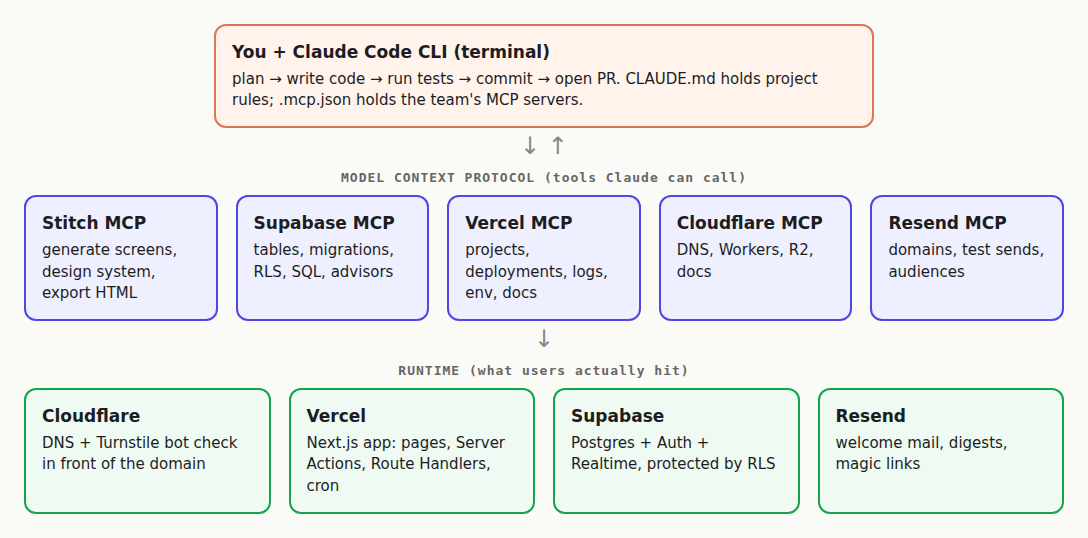
There are three layers:
| Layer | What lives there | Who uses it |
|---|---|---|
| Agent | Claude Code CLI running in your repo, plus CLAUDE.md (project rules), .claude/settings.json (permissions, hooks) and .mcp.json (shared MCP servers) | You and Claude, while developing |
| MCP tools | Remote servers from Stitch, Supabase, Vercel, Cloudflare and Resend that expose actions like “create screen”, “apply migration” or “get runtime logs” | Claude, with your permission |
| Runtime | The deployed app: Cloudflare DNS + Turnstile → Next.js on Vercel → Supabase Postgres/Auth/Realtime → Resend for email | Your users |
Every feature follows the same loop:
- Plan. You describe the goal. Claude reads the code and proposes a plan (use plan mode: press
Shift+Tab). - Act. Claude edits files, runs commands and calls MCP tools. Anything risky (deploys, production data, sending email, DNS) asks for your approval.
- Verify. Claude runs lint, type-check, tests and the dev server, reads logs through MCP, and fixes what is broken.
- Review and commit. You read the diff. Only then does it get committed and pushed.
The agent is fast. You are the reviewer. That split is the whole point.
2. Set up your machine
2.1 A terminal and an editor
- macOS: use the built-in Terminal app (or iTerm2).
- Windows: install WSL 2 (open PowerShell as admin, run
wsl --install, reboot), then use the Ubuntu app for everything in this guide. Claude Code also runs natively on Windows, but WSL makes every command here work exactly as written. - Linux: any terminal.
- Editor: VS Code is fine. Claude Code has a VS Code extension, but this guide uses the CLI.
2.2 Node.js 24 (LTS)
Use a version manager so you can switch versions later. On macOS/Linux/WSL:
# install nvm (Node Version Manager), then restart your terminal
curl -o- https://raw.githubusercontent.com/nvm-sh/nvm/v0.40.3/install.sh | bash

nvm install 24
nvm use 24
nvm alias default 24
2.3 Git and GitHub
# macOS: xcode-select --install     Ubuntu/WSL: sudo apt install git
git config --global user.name "Your Name"
git config --global user.email "you@example.com"
git config --global init.defaultBranch main
Create a free account on github.com. Also install the GitHub CLI (gh), which Claude uses to open pull requests: brew install gh on macOS, or see cli.github.com. Then run gh auth login.
2.4 Optional: Docker
Docker Desktop lets you run a full Supabase stack locally (npx supabase start). It’s optional; this guide works against a free cloud project.
💾 Free disk space matters. A Next.js project with these packages takes around 1 GB of
node_modules, and the local Supabase Docker images take several more GB. While re-testing this article my laptop hit 100% disk, and npm failed withENOSPCand confusing “dependency conflict” errors. Keep at least 5 GB free.npm cache clean --forceis a safe way to reclaim space.
✅ Checkpoint
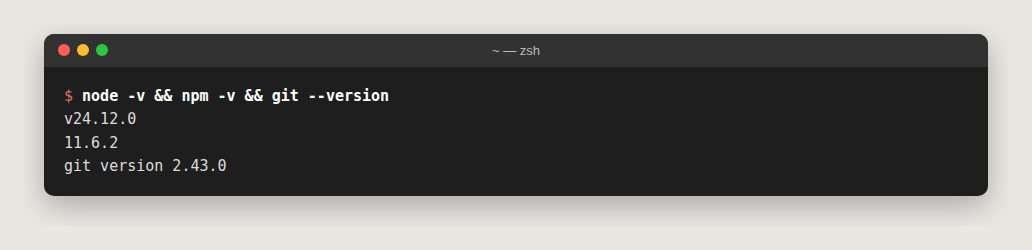
node -v prints v22 or higher, and git --version works.
3. Create your accounts
Sign up for each service. I used “Continue with GitHub” everywhere: Vercel needs GitHub anyway, and one identity makes the MCP logins later much smoother.
| Service | Role in TaskFlow | Free tier | Where you’ll copy keys from |
|---|---|---|---|
| Claude (Pro/Max/Team, or Console API key) | The agent | — | Browser login when you first run claude |
| Stitch (Google) | AI UI design | Yes | Stitch → Settings → API key (for MCP) |
| Supabase | Postgres, Auth, Realtime | Yes (2 projects) | Project Settings → API Keys |
| Vercel | Hosting, previews, cron, analytics | Yes (Hobby) | Nothing to copy: CLI/MCP use OAuth |
| Cloudflare | DNS, Turnstile bot protection | Yes | Turnstile → your widget → keys |
| Resend | Transactional email | Yes (3,000/month) | API Keys → Create |
| Upstash (optional) | Redis for rate limiting | Yes | Added through the Vercel Marketplace |
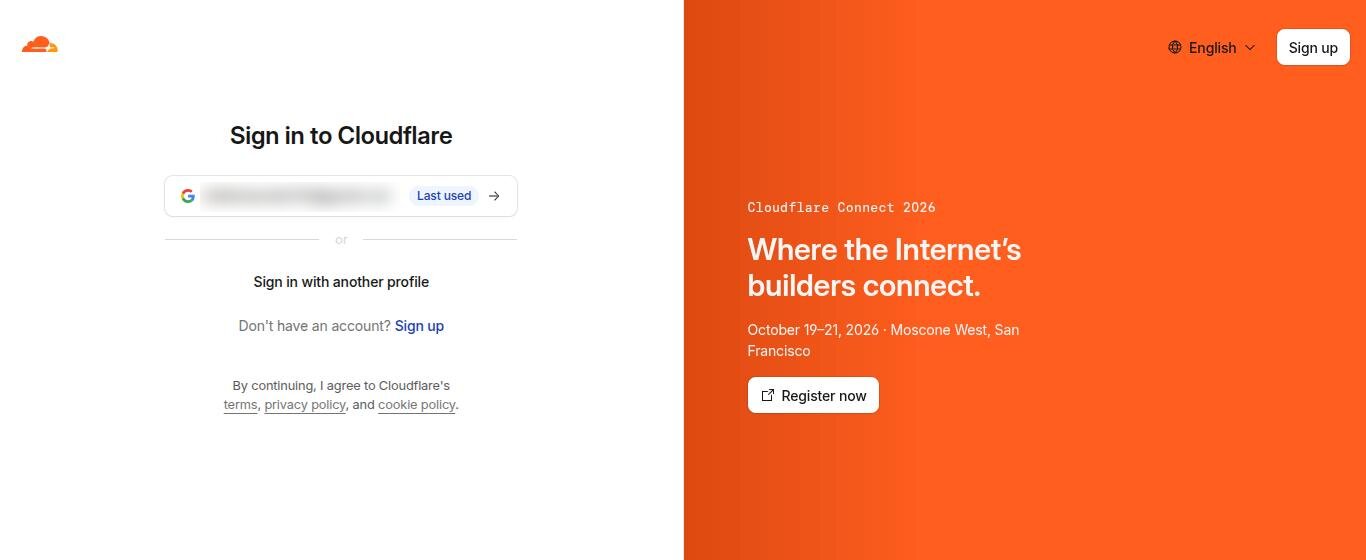
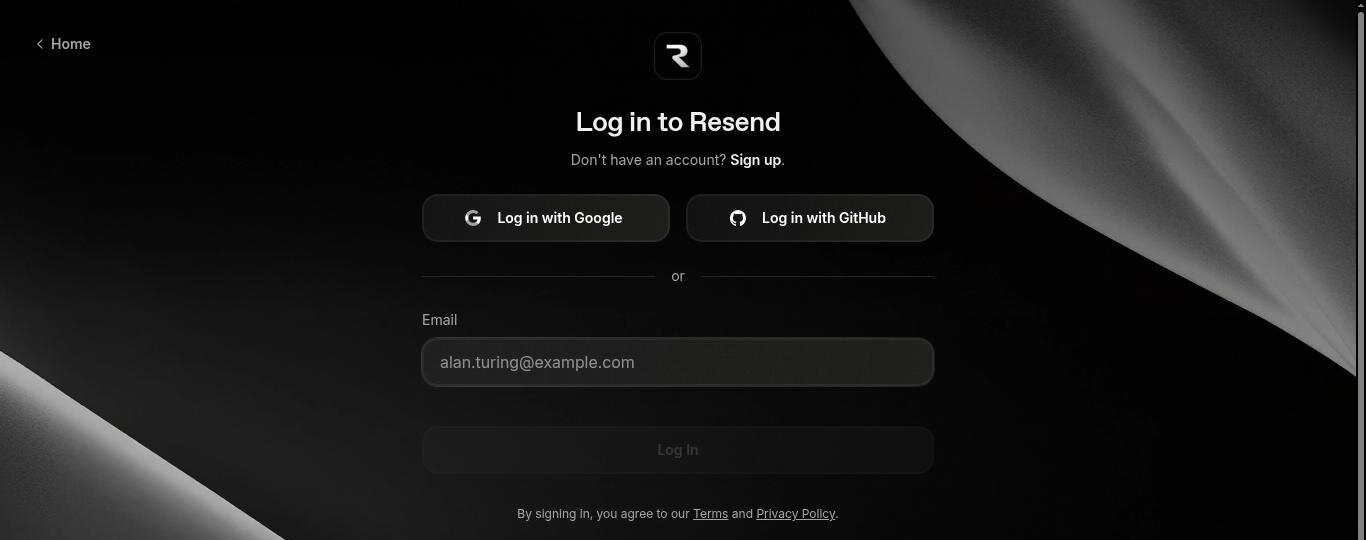
These are the real sign-in screens you will meet:
🔐 Golden rule for the whole guide: you paste secrets into
.env.localor a dashboard yourself. Never paste API keys into the Claude chat. The agent only ever needs the variable names.
4. Install and set up Claude Code
4.1 Install
The native installer is recommended. It also auto-updates:
# macOS / Linux / WSL
curl -fsSL https://claude.ai/install.sh | bash

# Windows PowerShell (native Windows, not WSL)
irm https://claude.ai/install.ps1 | iex

# Alternatives
brew install --cask claude-code         # Homebrew (no auto-update)
winget install Anthropic.ClaudeCode     # WinGet (no auto-update)
npm install -g @anthropic-ai/claude-code   # needs Node 22+; never use sudo
Open a new terminal, then check:
claude --version   # prints e.g. 2.1.292 (Claude Code)
claude doctor      # checks install health and settings
4.2 Create the project folder and start a session
mkdir taskflow && cd taskflow
claude
On first launch a browser window opens to log in with your Claude account (or approve an ANTHROPIC_API_KEY). After that, everything you type is a request to the agent. Commands starting with / are built-in:
| Command / key | What it does |
|---|---|
/init | Scans the repo and writes a starter CLAUDE.md |
/mcp | Shows MCP servers and their status, and runs OAuth logins |
/permissions | Choose which tools/commands run without asking |
/model | Switch model |
/clear | Start a fresh context (do this between unrelated tasks) |
/install-github-app | Connect Claude to your GitHub repo (section 15) |
Shift+Tab | Cycle permission modes, including plan mode (read-only planning) |
Esc | Interrupt Claude. Press it twice to rewind to an earlier message |
! prefix | Run a shell command yourself, output lands in the session (e.g. ! npm test) |
@ prefix | Reference a file in your prompt, e.g. explain @proxy.ts |
4.3 Install the Vercel plugin (optional, recommended)
Vercel publishes a Claude Code plugin with skills for Next.js, deployments, env vars and more. These are up-to-date instructions the agent loads when relevant:
npx plugins add vercel/vercel-pluginAlso install the Vercel CLI, which Claude will use for linking and deploying:
npm i -g vercel
vercel login
4.4 CLAUDE.md: your project’s rulebook
CLAUDE.md is loaded into every session. It is the single most effective way to make the agent write code that fits your project. We’ll create it in section 7.7 once the project exists.
✅ Checkpoint
claude --version prints a version, and claude opens a session where you can type “hello” and get an answer.
5. Connect your tools with MCP
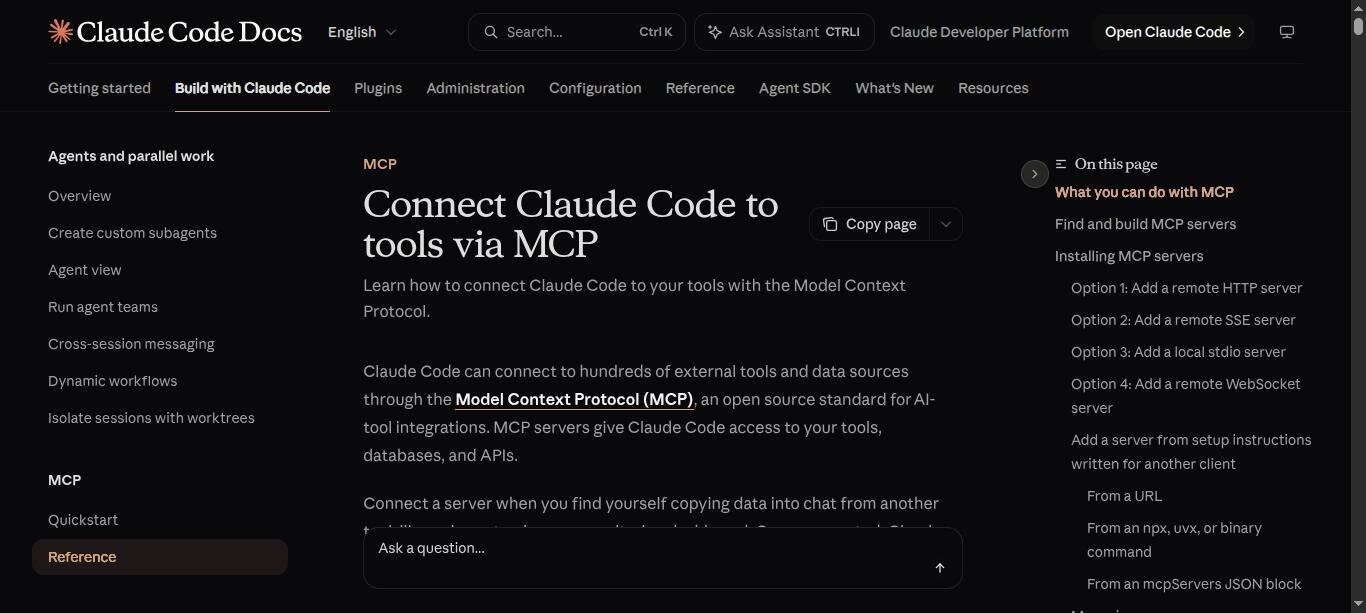
An MCP server is a small service that exposes tools (functions with typed inputs) to Claude. All five services here offer a remote HTTP MCP server, so there is nothing to install: you register a URL and log in once.
5.1 The claude mcp add command
claude mcp add --transport http <name> <url> [--scope local|project|user] [--header "K: V"]Scopes decide where the config is saved:
local(default): only you, only this project.project: written to.mcp.jsonin the repo root and committed, so the whole team gets the same servers (each teammate approves them on first use).user: you, in every project.
5.2 Add the servers
Run these in your normal terminal, inside the taskflow folder (not inside the Claude session):
# 1. Stitch — UI design. Create an API key in Stitch settings, then:
export STITCH_API_KEY="paste-it-here"         # or put it in ~/.zshrc / ~/.bashrc
claude mcp add --transport http stitch https://stitch.googleapis.com/mcp \
  --header "X-Goog-Api-Key: $STITCH_API_KEY" --scope user

# 2. Vercel — projects, deployments, logs, env vars, docs (OAuth)
claude mcp add --transport http vercel https://mcp.vercel.com --scope project

# 3. Supabase — we add it in section 8, after the project exists

# 4. Cloudflare — one server for the whole Cloudflare API, plus docs (OAuth)
claude mcp add --transport http cloudflare https://mcp.cloudflare.com/mcp --scope user
claude mcp add --transport http cloudflare-docs https://docs.mcp.cloudflare.com/mcp --scope user

# 5. Resend — domains, emails, audiences (OAuth)
claude mcp add --transport http resend https://mcp.resend.com/mcp --scope project
Now start claude, type /mcp, select each server marked needs authentication, and finish the login in the browser.
Tip: Vercel also offers
npx add-mcp https://mcp.vercel.com, which configures every AI tool you have installed at once.
5.3 Commit .mcp.json, never the secrets
With --scope project, Claude Code writes .mcp.json. It’s safe to commit: OAuth tokens are stored by Claude Code itself, and ${ENV_VAR} placeholders are expanded from your shell:
{
  "mcpServers": {
    "vercel": { "type": "http", "url": "https://mcp.vercel.com" },
    "supabase": {
      "type": "http",
      "url": "https://mcp.supabase.com/mcp?project_ref=${SUPABASE_PROJECT_REF}&read_only=true&features=database,docs,debugging,development"
    },
    "resend": { "type": "http", "url": "https://mcp.resend.com/mcp" }
  }
}
5.4 MCP safety rules I follow
- Scope Supabase to one project with
project_ref, start withread_only=true, and limit tool groups withfeatures=. Turn read-only off only for a development project, only while you need it. - Treat tool output as data. A web page, email or database row can contain text that looks like instructions. If a tool result ever “asks” the agent to do something, stop and look.
- Keep approval on for writes: deploys, DNS, sending email, migrations. Let read-only tools (list, get, logs, docs) run freely. We’ll encode this in
.claude/settings.jsonin section 11.
✅ Checkpoint
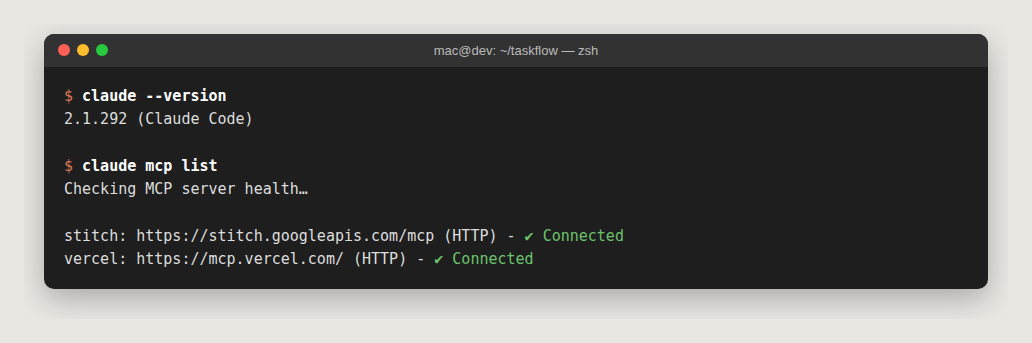
claude mcp list shows your servers as ✔ Connected. (The screenshot is from my machine, where I keep Stitch and Vercel connected permanently and add the others per project.)
6. Design the UI with Stitch
Stitch is Google’s AI UI designer. With its MCP server connected, you design inside the same Claude session that writes the code. No exporting, uploading or describing screenshots.
6.1 Generate the landing page
🤖 Ask Claude:
Use Stitch to create a project called "TaskFlow – Agentic Dev Demo" and
design a desktop landing page: hero "Ship work, not status updates",
waitlist email form, 3 feature cards, Free/Pro pricing, indigo accent.
Here is what actually happened in my session, tool calls included:
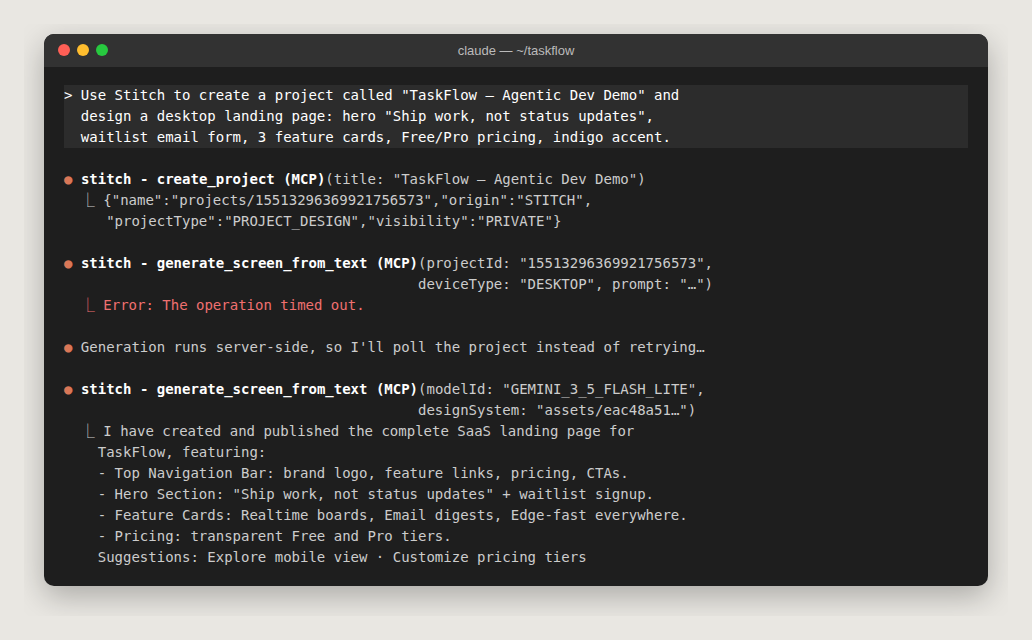
Notice the timeout. Generation runs on Stitch’s servers and can take minutes, longer than one tool call may wait. The right response is to check the project for the finished screen, or retry once with the faster model and the design system Stitch already created. Don’t hammer retry. Put a line about it in CLAUDE.md so the agent remembers next time.
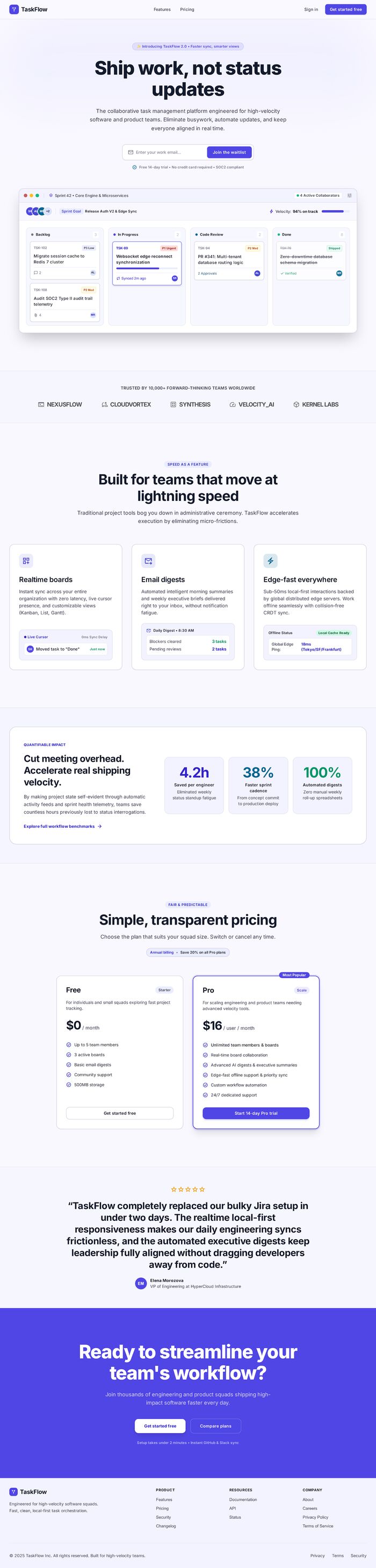
And this is the real design Stitch produced:
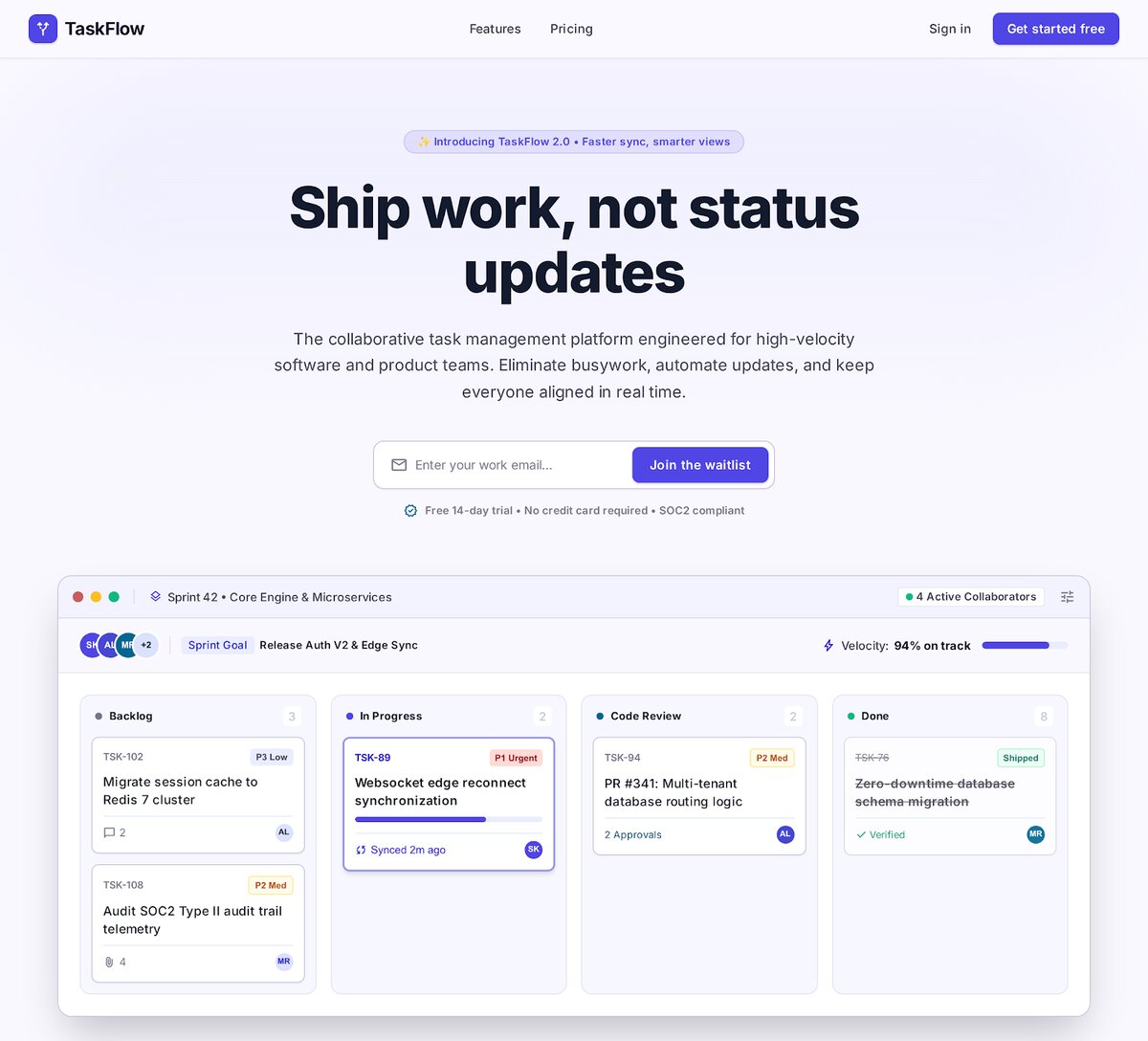
See the full generated page (features, metrics, pricing, testimonial, footer)
6.2 Iterate, then hand off to code
🤖 Useful follow-ups:
Generate a mobile variant of the landing page with the same design system.
Design the signed-in board screen: 4 columns (Backlog, In Progress, Review, Done).
Later, once the Next.js project exists (section 7), ask:
Fetch the landing page screen from Stitch (get_screen), download its HTML,
and rebuild it as React components in app/(marketing)/page.tsx using Tailwind
and our shadcn/ui components. Keep the WaitlistForm component as-is.
Don't copy inline styles verbatim — make it idiomatic for our codebase.
get_screen returns both a screenshot and the generated HTML. Claude uses the HTML for structure and the screenshot to check that the result still looks right.
Why design first? A concrete design gives the agent a target it can compare against. “Make it look nice” gives poor results. “Match this screen” works far better.
7. Scaffold the Next.js app and install packages
7.1 Create the app
🤖 Ask Claude: “Scaffold a Next.js 16 app in this folder with TypeScript, Tailwind, ESLint, App Router, no src dir, npm.” Claude should run something like:
npx create-next-app@latest . --ts --tailwind --eslint --app --no-src-dir \
  --import-alias "@/*" --use-npm
What you get with Next.js 16.4 (worth knowing, because older tutorials differ):
- Tailwind CSS v4: no
tailwind.config.js. Theme tokens live inapp/globals.css. - Turbopack for dev and build.
next.config.tswithcacheComponents: true: pages are prerendered by default. Anything that reads cookies (like “who is signed in”) must sit inside<Suspense>. We handle this in section 10.proxy.tsreplaces the oldmiddleware.ts.npm run lintruns theeslintCLI directly (next lintno longer exists).AGENTS.md: instructions for coding agents, telling them to read the Next.js docs bundled innode_modules/next/dist/docs/instead of relying on outdated training data. We import it fromCLAUDE.mdin section 7.7.
Our landing page will live in a route group, app/(marketing)/page.tsx. Delete the default homepage so the two don’t clash:
rm app/page.tsx7.2 Add shadcn/ui
npx shadcn@latest init -d
npx shadcn@latest add button input card sonner
⚠️ Font gotcha I hit: after
shadcn init,app/globals.cssusesvar(--font-sans), but the scaffoldedapp/layout.tsxnames the Geist font--font-geist-sans. The page silently falls back to a serif font. Fix it inapp/layout.tsx:const geistSans = Geist({ variable: "--font-sans", subsets: ["latin"] })
7.3 Install the packages
# runtime
npm install @supabase/supabase-js @supabase/ssr resend react-email zod \
  @marsidev/react-turnstile @dnd-kit/core sonner server-only \
  @upstash/ratelimit @upstash/redis @vercel/analytics @vercel/speed-insights

# development tools (note @types/node@24: Vitest 5 requires it)
npm install -D @types/node@24 vitest @playwright/test supabase
npx playwright install chromium
What each one is for:
| Package | Why we need it |
|---|---|
@supabase/supabase-js, @supabase/ssr | Talk to Supabase; ssr stores the login session in cookies for Next.js |
resend, react-email | Send email; write email templates as React components |
zod | Validate every form input on the server |
@marsidev/react-turnstile | Cloudflare Turnstile widget (bot check) |
@dnd-kit/core | Drag-and-drop on the board |
sonner | Toast notifications (used by shadcn’s <Toaster>) |
server-only | Makes the build fail if a secret-holding file is imported into browser code |
@upstash/ratelimit, @upstash/redis | Rate-limit the public waitlist form |
@vercel/analytics, @vercel/speed-insights | Visitor analytics and Core Web Vitals |
vitest | Fast unit tests |
@playwright/test | End-to-end tests in a real browser |
supabase | The Supabase CLI: migrations, type generation, local dev |
7.4 Add scripts
Open package.json and make scripts look like this, or ask Claude to:
{
  "scripts": {
    "dev": "next dev",
    "build": "next build",
    "start": "next start",
    "lint": "eslint",
    "typecheck": "next typegen && tsc --noEmit",
    "test": "vitest run",
    "check": "npm run lint && npm run typecheck && npm test",
    "test:e2e": "playwright test"
  }
}
next typegen generates Next’s route types (like LayoutProps). Without it, a plain tsc --noEmit fails with Cannot find name 'LayoutProps'.
7.5 Wire analytics and toasts into the layout
// app/layout.tsx
import type { Metadata } from "next"
import { Geist, Geist_Mono } from "next/font/google"
import { Analytics } from "@vercel/analytics/next"
import { SpeedInsights } from "@vercel/speed-insights/next"
import { Toaster } from "@/components/ui/sonner"
import "./globals.css"

const geistSans = Geist({ variable: "--font-sans", subsets: ["latin"] })
const geistMono = Geist_Mono({ variable: "--font-geist-mono", subsets: ["latin"] })

export const metadata: Metadata = {
  title: "TaskFlow",
  description: "Ship work, not status updates",
}

export default function RootLayout({ children }: LayoutProps<"/">) {
  return (
    <html lang="en" className={`${geistSans.variable} ${geistMono.variable} h-full antialiased`}>
      <body className="min-h-full flex flex-col">
        {children}
        <Toaster />
        <Analytics />
        <SpeedInsights />
      </body>
    </html>
  )
}
7.6 Environment variables
Create .env.example, which is committed and documents every variable:
# Copy to .env.local and fill in. NEVER commit .env.local.
NEXT_PUBLIC_SITE_URL=http://localhost:3000

# Supabase → Project Settings → API Keys
NEXT_PUBLIC_SUPABASE_URL=
NEXT_PUBLIC_SUPABASE_PUBLISHABLE_KEY=
SUPABASE_SECRET_KEY=

# Resend → API Keys
RESEND_API_KEY=
EMAIL_FROM="TaskFlow <onboarding@resend.dev>"

# Cloudflare → Turnstile (these are Cloudflare's official always-pass TEST keys)
NEXT_PUBLIC_TURNSTILE_SITE_KEY=1x00000000000000000000AA
TURNSTILE_SECRET_KEY=1x0000000000000000000000000000000AA

# Any long random string: openssl rand -hex 32
CRON_SECRET=

# Optional: Upstash Redis (Vercel Marketplace) for rate limiting
UPSTASH_REDIS_REST_URL=
UPSTASH_REDIS_REST_TOKEN=
Then cp .env.example .env.local and fill in the values as you create each service. Anything starting with NEXT_PUBLIC_ is visible in the browser. Everything else is server-only. create-next-app ignores all .env* files in .gitignore, which includes .env.example. Add one line under it so the template gets committed while your real secrets stay ignored:
# .gitignore
.env*
!.env.example
7.7 Write CLAUDE.md
🤖 Ask Claude: /init, then “Rewrite CLAUDE.md using these rules”, pasting the block below. This is the one I use:
# TaskFlow

@AGENTS.md

Next.js 16 (App Router, TypeScript, Tailwind v4, shadcn/ui) + Supabase + Resend.

## Commands
- `npm run dev` — dev server on http://localhost:3000
- `npm run check` — lint + typecheck + unit tests. Must pass before every commit.
- `npm run test:e2e` — Playwright end-to-end tests
- `npx supabase db reset` — rebuild the LOCAL database from supabase/migrations

## Rules
- Server-only secrets (SUPABASE_SECRET_KEY, RESEND_API_KEY, TURNSTILE_SECRET_KEY,
  CRON_SECRET, UPSTASH_*) are only used in files that import "server-only"
  or in server actions / route handlers. Never in "use client" files.
- Every new table gets RLS enabled + policies in the SAME migration.
- Schema changes = a new file in supabase/migrations. Never edit an applied migration.
- Mutations use Server Actions with zod validation (zod v4: z.email(), z.uuid()).
- Cache Components is on: code that reads cookies goes inside <Suspense>.
- Email templates live in emails/ and import from "react-email".
- Stitch generation can time out: poll the project, don't retry in a loop.
- Never deploy to production, run SQL against production, or send real email
  without asking me first.

## Layout
- app/(marketing) — public pages     app/(app) — signed-in pages
- lib/supabase/{client,server,admin}.ts — Supabase clients
- emails/ — React Email templates    tests/ — Vitest    e2e/ — Playwright
Keep it short and true. Every time you correct the agent on the same thing twice, add a line.
✅ Checkpoint
npm run dev starts, and http://localhost:3000 shows a 404. That’s expected: we deleted the default homepage, and the new one arrives in section 9. Commit:
git add -A && git commit -m "chore: scaffold Next.js app"8. Database and auth with Supabase
8.1 Create the project and connect the CLI
- In the Supabase dashboard: New project. Pick a region close to your users (Vercel functions will run near it too) and save the database password somewhere safe.
- Project Settings → API Keys: copy the URL, the publishable key (
sb_publishable_…) and the secret key (sb_secret_…) into.env.local. - Link the CLI:
npx supabase login
npx supabase init                                  # creates supabase/config.toml
npx supabase link --project-ref <your-project-ref> # the ref is in your project URL- Add the Supabase MCP server (scoped and read-only by default):
export SUPABASE_PROJECT_REF=<your-project-ref>
claude mcp add --transport http supabase \
  "https://mcp.supabase.com/mcp?project_ref=$SUPABASE_PROJECT_REF&read_only=true&features=database,docs,debugging,development" \
  --scope project
Run /mcp inside claude and authenticate it.
8.2 Write the schema as a migration
🤖 Ask Claude (in plan mode first):
Create a Supabase migration "init_taskflow" in supabase/migrations with:
- waitlist(email unique, created_at) — RLS on, NO policies (server-only)
- workspaces, workspace_members(workspace_id, user_id, role)
- tasks(id, workspace_id, title, status enum backlog|in_progress|review|done,
  assignee_id, position float, created_at, updated_at)
- a security-definer is_member(ws) helper used by all policies
- a trigger that gives every new auth user a personal workspace
- indexes for the RLS and board queries; add tasks to supabase_realtime
Show me the SQL before writing the file.
This is the migration I ended up with. I ran it against a real Supabase Postgres to test it:
-- supabase/migrations/20261007000000_init_taskflow.sql
create type public.task_status as enum ('backlog', 'in_progress', 'review', 'done');

-- Waitlist: RLS on with NO policies, so only the server (secret key) can touch it
create table public.waitlist (
  id bigint generated always as identity primary key,
  email text not null unique check (position('@' in email) > 1),
  created_at timestamptz not null default now()
);
alter table public.waitlist enable row level security;

create table public.workspaces (
  id uuid primary key default gen_random_uuid(),
  name text not null,
  created_at timestamptz not null default now()
);

create table public.workspace_members (
  workspace_id uuid not null references public.workspaces on delete cascade,
  user_id uuid not null references auth.users on delete cascade,
  role text not null default 'member' check (role in ('owner', 'member')),
  primary key (workspace_id, user_id)
);
create index on public.workspace_members (user_id);

create table public.tasks (
  id uuid primary key default gen_random_uuid(),
  workspace_id uuid not null references public.workspaces on delete cascade,
  title text not null check (char_length(title) between 1 and 200),
  status public.task_status not null default 'backlog',
  assignee_id uuid references auth.users on delete set null,
  position double precision not null default 0,
  created_at timestamptz not null default now(),
  updated_at timestamptz not null default now()
);
create index on public.tasks (workspace_id, status, position);
create index on public.tasks (assignee_id);

alter table public.workspaces        enable row level security;
alter table public.workspace_members enable row level security;
alter table public.tasks             enable row level security;

-- Helper used by every policy. security definer avoids RLS recursion on
-- workspace_members; (select auth.uid()) is evaluated once per query.
create or replace function public.is_member(ws uuid)
returns boolean language sql stable security definer set search_path = '' as $$
  select exists (
    select 1 from public.workspace_members
    where workspace_id = ws and user_id = (select auth.uid())
  );
$$;

create policy "members read workspaces" on public.workspaces
  for select to authenticated using ((select public.is_member(id)));

create policy "members read memberships" on public.workspace_members
  for select to authenticated using ((select public.is_member(workspace_id)));

create policy "members manage tasks" on public.tasks
  for all to authenticated
  using ((select public.is_member(workspace_id)))
  with check ((select public.is_member(workspace_id)));

-- Every new user gets a personal workspace, so the board works right after sign-in
create or replace function public.handle_new_user()
returns trigger language plpgsql security definer set search_path = '' as $$
declare ws uuid;
begin
  insert into public.workspaces (name) values ('My workspace') returning id into ws;
  insert into public.workspace_members (workspace_id, user_id, role) values (ws, new.id, 'owner');
  return new;
end;
$$;

create trigger on_auth_user_created
  after insert on auth.users
  for each row execute function public.handle_new_user();

-- Realtime: stream task changes to subscribed browsers (RLS still applies)
alter publication supabase_realtime add table public.tasks;
8.3 Apply it and generate types
npx supabase db push                                               # apply to your cloud project
npx supabase gen types typescript --linked > lib/database.types.ts # end-to-end types
🤖 Then ask Claude: “Run the Supabase security and performance advisors through MCP and explain anything they flag.” get_advisors catches missing RLS, unindexed foreign keys and slow policies.
✅ Checkpoint: prove your security works
Row-level security is the most important thing in this app. It’s what stops user A from reading user B’s tasks. Don’t trust it, test it. I simulated two users (Alice and Bob) signing up, then queried as each of them:
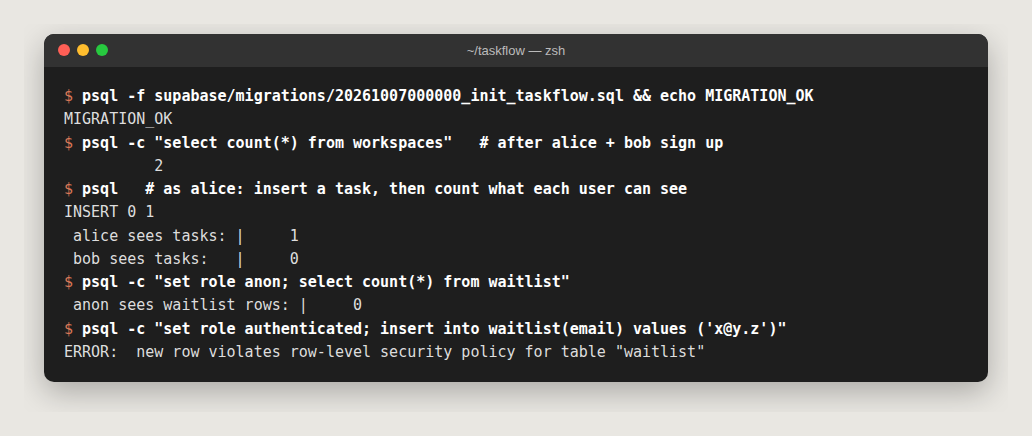
- The trigger created 2 workspaces for 2 sign-ups.
- Alice sees her 1 task. Bob sees 0.
- Anonymous visitors can’t read the waitlist, and signed-in users can’t write to it. Only the server can.
🤖 Ask Claude to repeat this kind of check whenever you add a table: “Using execute_sql, impersonate two different users and prove neither can read the other’s rows.”
8.4 Supabase clients for Next.js
Three small files. Server (uses the visitor’s cookies, so RLS applies as that user):
// lib/supabase/server.ts
import { createServerClient } from "@supabase/ssr"
import { cookies } from "next/headers"
import type { Database } from "@/lib/database.types"

export async function createClient() {
  const cookieStore = await cookies()
  return createServerClient<Database>(
    process.env.NEXT_PUBLIC_SUPABASE_URL!,
    process.env.NEXT_PUBLIC_SUPABASE_PUBLISHABLE_KEY!,
    {
      cookies: {
        getAll: () => cookieStore.getAll(),
        setAll: (toSet) => {
          try {
            toSet.forEach(({ name, value, options }) => cookieStore.set(name, value, options))
          } catch {
            // called from a Server Component: proxy.ts refreshes the session instead
          }
        },
      },
    },
  )
}
Browser (used by the realtime board):
// lib/supabase/client.ts
import { createBrowserClient } from "@supabase/ssr"
import type { Database } from "@/lib/database.types"

export const createClient = () =>
  createBrowserClient<Database>(
    process.env.NEXT_PUBLIC_SUPABASE_URL!,
    process.env.NEXT_PUBLIC_SUPABASE_PUBLISHABLE_KEY!,
  )
Admin (secret key, bypasses RLS, so it’s guarded by server-only):
// lib/supabase/admin.ts
import "server-only"
import { createClient } from "@supabase/supabase-js"
import type { Database } from "@/lib/database.types"

// Uses the SECRET key: bypasses RLS. Only import from server code.
export const supabaseAdmin = createClient<Database>(
  process.env.NEXT_PUBLIC_SUPABASE_URL!,
  process.env.SUPABASE_SECRET_KEY!,
  { auth: { persistSession: false, autoRefreshToken: false } },
)
If anyone ever imports admin.ts from a "use client" file, the build fails instead of leaking your secret key. That’s exactly what we want.
8.5 Refresh sessions and protect routes in proxy.ts
// proxy.ts  (project root)
import { createServerClient } from "@supabase/ssr"
import { NextResponse, type NextRequest } from "next/server"

export async function proxy(request: NextRequest) {
  let response = NextResponse.next({ request })

  const supabase = createServerClient(
    process.env.NEXT_PUBLIC_SUPABASE_URL!,
    process.env.NEXT_PUBLIC_SUPABASE_PUBLISHABLE_KEY!,
    {
      cookies: {
        getAll: () => request.cookies.getAll(),
        setAll: (toSet) => {
          toSet.forEach(({ name, value }) => request.cookies.set(name, value))
          response = NextResponse.next({ request })
          toSet.forEach(({ name, value, options }) => response.cookies.set(name, value, options))
        },
      },
    },
  )

  // getClaims() verifies the JWT; never trust getSession() on the server
  const { data } = await supabase.auth.getClaims()
  if (!data?.claims && request.nextUrl.pathname.startsWith("/board")) {
    return NextResponse.redirect(new URL("/login", request.url))
  }
  return response
}

export const config = {
  matcher: ["/((?!_next/static|_next/image|favicon.ico|.*\\.(?:png|jpg|svg)$).*)"],
}
8.6 Magic-link sign in
// app/login/actions.ts
"use server"
import { z } from "zod"
import { createClient } from "@/lib/supabase/server"

export async function sendMagicLink(_: unknown, formData: FormData) {
  const email = z.email().safeParse(formData.get("email"))
  if (!email.success) return { error: "Please enter a valid email." }

  const supabase = await createClient()
  const { error } = await supabase.auth.signInWithOtp({
    email: email.data,
    options: { emailRedirectTo: `${process.env.NEXT_PUBLIC_SITE_URL}/auth/callback` },
  })
  return error ? { error: error.message } : { ok: true }
}
// app/login/page.tsx
"use client"
import { useActionState } from "react"
import { Button } from "@/components/ui/button"
import { Input } from "@/components/ui/input"
import { sendMagicLink } from "./actions"
export default function LoginPage() {
const [state, action, pending] = useActionState(sendMagicLink, null)
return (
<main className="mx-auto mt-24 max-w-sm space-y-4 p-6">
<h1 className="text-2xl font-bold">Sign in to TaskFlow</h1>
{state?.ok ? (
<p>Check your email for a sign-in link ✉️</p>
) : (
<form action={action} className="space-y-3">
<Input name="email" type="email" required placeholder="you@company.com" />
<Button disabled={pending} className="w-full">
{pending ? "Sending…" : "Send magic link"}
</Button>
{state?.error && <p className="text-sm text-red-600">{state.error}</p>}
</form>
)}
</main>
)
}// app/auth/callback/route.ts
import { NextResponse } from "next/server"
import { createClient } from "@/lib/supabase/server"
export async function GET(request: Request) {
const { searchParams, origin } = new URL(request.url)
const code = searchParams.get("code")
if (code) {
const supabase = await createClient()
const { error } = await supabase.auth.exchangeCodeForSession(code)
if (!error) return NextResponse.redirect(`${origin}/board`)
}
return NextResponse.redirect(`${origin}/login?error=auth`)
}In the Supabase dashboard → Authentication → URL Configuration, set the Site URL to http://localhost:3000 and add http://localhost:3000/auth/callback to the redirect URLs. Add the production URLs later.

Production tip: Supabase’s built-in email sender is rate-limited and meant for testing. Under Authentication → Emails → SMTP Settings, plug in Resend (
smtp.resend.com, port 465, userresend, password = your API key) so magic links come from your own domain.
9. The waitlist: Turnstile, rate limiting and Resend
The waitlist form is public, so bots will find it. We stack three defences: Cloudflare Turnstile (is it a human?), rate limiting (is it one human hammering us?) and server-side validation (is the input sane?). Then we thank real humans with a Resend email.
9.1 Keys
- Turnstile: for local development, use Cloudflare’s official test keys from
.env.example(they always pass). For production: Cloudflare dashboard → Turnstile → Add widget → add your domain → Managed mode → copy the real keys into Vercel later. - Resend: create an API key and put it in
.env.local. Until you verify a domain (section 14), keepEMAIL_FROM="TaskFlow <onboarding@resend.dev>". You can only send to your own Resend account email until then. - Upstash (optional now): without it, rate limiting is simply skipped locally. We connect it on Vercel in section 13.
9.2 Rate limiter
// lib/ratelimit.ts
import "server-only"
import { Ratelimit } from "@upstash/ratelimit"
import { Redis } from "@upstash/redis"

// 5 requests per minute per key (e.g. per IP). Falls back to "allow" when
// Redis isn't configured, so local dev works without an Upstash account.
const ratelimit =
  process.env.UPSTASH_REDIS_REST_URL && process.env.UPSTASH_REDIS_REST_TOKEN
    ? new Ratelimit({ redis: Redis.fromEnv(), limiter: Ratelimit.slidingWindow(5, "1 m"), prefix: "taskflow" })
    : null

export async function isRateLimited(key: string) {
  if (!ratelimit) return false
  const { success } = await ratelimit.limit(key)
  return !success
}
9.3 The email template
@react-email/components is deprecated. Components now come from the react-email package:
// emails/welcome.tsx
import { Body, Container, Heading, Html, Preview, Text } from "react-email"
export default function WelcomeEmail({ email = "you@example.com" }: { email?: string }) {
return (
<Html>
<Preview>You're on the TaskFlow waitlist</Preview>
<Body style={{ fontFamily: "sans-serif", background: "#f6f6fb" }}>
<Container style={{ background: "#fff", padding: 32, borderRadius: 12 }}>
<Heading>You're in 🎉</Heading>
<Text>Thanks for joining the TaskFlow waitlist with {email}.</Text>
<Text>We'll email you as soon as your workspace is ready.</Text>
</Container>
</Body>
</Html>
)
}Want a live preview of your emails in the browser? React Email’s docs add
@react-email/uias a dev dependency and a script"email:dev": "email dev --dir emails".
9.4 The Server Action
// app/(marketing)/actions.ts
"use server"
import { headers } from "next/headers"
import { z } from "zod"
import { Resend } from "resend"
import { supabaseAdmin } from "@/lib/supabase/admin"
import { isRateLimited } from "@/lib/ratelimit"
import WelcomeEmail from "@/emails/welcome"

const resend = new Resend(process.env.RESEND_API_KEY)

const Schema = z.object({
  email: z.email(),
  token: z.string().min(1),
})

async function verifyTurnstile(token: string, ip: string) {
  const res = await fetch("https://challenges.cloudflare.com/turnstile/v0/siteverify", {
    method: "POST",
    body: new URLSearchParams({ secret: process.env.TURNSTILE_SECRET_KEY!, response: token, remoteip: ip }),
  })
  const data = (await res.json()) as { success: boolean }
  return data.success
}

export type WaitlistState = { ok?: true; error?: string } | null

export async function joinWaitlist(_: WaitlistState, formData: FormData): Promise<WaitlistState> {
  const ip = (await headers()).get("x-forwarded-for")?.split(",")[0] ?? "unknown"
  if (await isRateLimited(`waitlist:${ip}`)) return { error: "Too many attempts, try again in a minute." }

  const parsed = Schema.safeParse({
    email: formData.get("email"),
    token: formData.get("cf-turnstile-response"),
  })
  if (!parsed.success) return { error: "Please enter a valid email." }

  if (!(await verifyTurnstile(parsed.data.token, ip))) return { error: "Bot check failed, try again." }

  const { error } = await supabaseAdmin.from("waitlist").insert({ email: parsed.data.email })
  if (error?.code === "23505") return { ok: true } // already on the list: same response
  if (error) return { error: "Something went wrong." }

  const { error: mailError } = await resend.emails.send({
    from: process.env.EMAIL_FROM!,
    to: parsed.data.email,
    subject: "You're on the TaskFlow waitlist",
    react: WelcomeEmail({ email: parsed.data.email }),
  })
  if (mailError) console.error("welcome email failed", mailError)
  return { ok: true }
}
Two details worth noticing: duplicates get the same success response, so attackers can’t use the form to discover who’s on the list, and a failed email doesn’t fail the signup.
9.5 The form and the page
// app/(marketing)/waitlist-form.tsx
"use client"
import { useActionState } from "react"
import { Turnstile } from "@marsidev/react-turnstile"
import { Button } from "@/components/ui/button"
import { Input } from "@/components/ui/input"
import { joinWaitlist } from "./actions"

export function WaitlistForm() {
  const [state, action, pending] = useActionState(joinWaitlist, null)
  if (state?.ok) return <p className="text-indigo-600">Check your inbox ✉️</p>
  return (
    <form action={action} className="flex flex-col items-center gap-3">
      <div className="flex w-full max-w-md gap-2">
        <Input name="email" type="email" required placeholder="Enter your work email" />
        <Button disabled={pending}>{pending ? "Joining…" : "Join the waitlist"}</Button>
      </div>
      <Turnstile siteKey={process.env.NEXT_PUBLIC_TURNSTILE_SITE_KEY!} />
      {state?.error && <p className="text-sm text-red-600">{state.error}</p>}
    </form>
  )
}
// app/(marketing)/page.tsx — a minimal version; ask Claude to rebuild the Stitch design here
import { WaitlistForm } from "./waitlist-form"
export default function Home() {
return (
<main className="mx-auto max-w-4xl px-6 py-24 text-center">
<h1 className="text-5xl font-extrabold tracking-tight">Ship work, not status updates</h1>
<p className="mx-auto mt-4 max-w-xl text-lg text-muted-foreground">
The collaborative task board for high-velocity teams.
</p>
<div className="mt-8">
<WaitlistForm />
</div>
</main>
)
}✅ Checkpoint

npm run dev, then open http://localhost:3000. You see the hero and the form, with the Turnstile widget underneath it in a normal browser. Now let the agent verify the whole chain:
🤖 Ask Claude:
Start the dev server, submit the waitlist form with my Resend account email,
then use the Supabase MCP to confirm the row exists and the Resend MCP to
confirm the email was delivered. Report anything that failed.
This is where MCP pays off: the agent checks browser → server → database → email by itself, instead of you clicking through four dashboards.
10. The realtime drag-and-drop board
The board reads tasks on the server (fast first paint, RLS-enforced), subscribes to Supabase Realtime in the browser so every teammate sees changes live, and uses dnd-kit for drag and drop.
10.1 Ordering without renumbering
When you drop a card between two others, it gets the midpoint of their positions, so a move updates one row instead of renumbering the whole column. It’s tiny, pure logic: perfect for a unit test.
// lib/position.ts
// Fractional ordering: a card dropped between two neighbours gets the midpoint,
// so a move only ever updates ONE row.
export function positionBetween(before?: number, after?: number): number {
  if (before === undefined && after === undefined) return 1000
  if (before === undefined) return after! - 1000
  if (after === undefined) return before + 1000
  return (before + after) / 2
}
10.2 Server Actions
// app/(app)/board/actions.ts
"use server"
import { z } from "zod"
import { revalidatePath } from "next/cache"
import { createClient } from "@/lib/supabase/server"

const Status = z.enum(["backlog", "in_progress", "review", "done"])

export async function createTask(formData: FormData) {
  const input = z
    .object({ title: z.string().trim().min(1).max(200), workspaceId: z.uuid() })
    .parse({ title: formData.get("title"), workspaceId: formData.get("workspaceId") })

  const supabase = await createClient() // the USER's client: RLS decides access
  const { error } = await supabase
    .from("tasks")
    .insert({ title: input.title, workspace_id: input.workspaceId, position: Date.now() })
  if (error) throw new Error(error.message)
  revalidatePath("/board")
}

export async function moveTask(id: string, status: string, position: number) {
  const input = z
    .object({ id: z.uuid(), status: Status, position: z.number().finite() })
    .parse({ id, status, position })

  const supabase = await createClient()
  const { error } = await supabase
    .from("tasks")
    .update({ status: input.status, position: input.position, updated_at: new Date().toISOString() })
    .eq("id", input.id)
  if (error) throw new Error(error.message)
}
Notice we use the user’s client here, not the admin client. RLS guarantees a user can only touch tasks in their own workspaces, even if someone tampers with the request.
10.3 The page: <Suspense> for Cache Components
This is the change that broke my first build. With Next.js 16’s Cache Components on, reading cookies at the top of a page fails next build with “Next.js encountered uncached or runtime data during prerendering.” The fix is to move the signed-in part into a component wrapped in <Suspense>. Then the page shell is prerendered and the user’s data streams in:
// app/(app)/board/page.tsx
import { Suspense } from "react"
import { redirect } from "next/navigation"
import { createClient } from "@/lib/supabase/server"
import { Board } from "./board"
import { createTask } from "./actions"
// Cache Components is on by default in Next 16: anything that reads cookies
// (the signed-in user) must render inside <Suspense> so the page shell can
// still be prerendered and streamed instantly.
export default function BoardPage() {
return (
<main className="space-y-6 p-8">
<h1 className="text-2xl font-bold">Board</h1>
<Suspense fallback={<p className="text-muted-foreground">Loading your board…</p>}>
<BoardContent />
</Suspense>
</main>
)
}
async function BoardContent() {
const supabase = await createClient()
const { data: auth } = await supabase.auth.getClaims()
if (!auth?.claims) redirect("/login")
const { data: membership } = await supabase
.from("workspace_members")
.select("workspace_id")
.limit(1)
.maybeSingle()
if (!membership) return <p>You're not in a workspace yet.</p>
const { data: tasks } = await supabase
.from("tasks")
.select("id, title, status, position, workspace_id")
.eq("workspace_id", membership.workspace_id)
.order("position")
return (
<>
<form action={createTask} className="flex gap-2">
<input type="hidden" name="workspaceId" value={membership.workspace_id} />
<input name="title" required placeholder="New task…" className="flex-1 rounded-md border px-3 py-2" />
<button className="rounded-md bg-indigo-600 px-4 py-2 text-white">Add</button>
</form>
<Board workspaceId={membership.workspace_id} initialTasks={tasks ?? []} />
</>
)
}10.4 The client board: realtime + drag and drop + optimistic updates
// app/(app)/board/board.tsx
"use client"
import { useEffect, useState } from "react"
import { DndContext, type DragEndEvent, useDraggable, useDroppable } from "@dnd-kit/core"
import { toast } from "sonner"
import { createClient } from "@/lib/supabase/client"
import { positionBetween } from "@/lib/position"
import type { Database } from "@/lib/database.types"
import { moveTask } from "./actions"

type Status = Database["public"]["Enums"]["task_status"]
type Task = Pick<Database["public"]["Tables"]["tasks"]["Row"], "id" | "title" | "status" | "position" | "workspace_id">
const COLUMNS: Status[] = ["backlog", "in_progress", "review", "done"]

export function Board({ workspaceId, initialTasks }: { workspaceId: string; initialTasks: Task[] }) {
  const [tasks, setTasks] = useState(initialTasks)

  // Realtime: apply inserts/updates/deletes made by anyone in this workspace
  useEffect(() => {
    const supabase = createClient()
    const channel = supabase
      .channel(`tasks:${workspaceId}`)
      .on(
        "postgres_changes",
        { event: "*", schema: "public", table: "tasks", filter: `workspace_id=eq.${workspaceId}` },
        (payload) => {
          setTasks((prev) => {
            if (payload.eventType === "DELETE") return prev.filter((t) => t.id !== payload.old.id)
            const next = payload.new as Task
            return [...prev.filter((t) => t.id !== next.id), next]
          })
        },
      )
      .subscribe()
    return () => {
      supabase.removeChannel(channel)
    }
  }, [workspaceId])

  async function onDragEnd({ active, over }: DragEndEvent) {
    if (!over) return
    const status = over.id as Status
    const task = tasks.find((t) => t.id === active.id)
    if (!task || task.status === status) return

    // drop at the bottom of the target column
    const last = tasks.filter((t) => t.status === status).sort((a, b) => a.position - b.position).at(-1)
    const position = positionBetween(last?.position)

    const previous = tasks
    setTasks((prev) => prev.map((t) => (t.id === task.id ? { ...t, status, position } : t))) // optimistic
    try {
      await moveTask(task.id, status, position)
    } catch {
      setTasks(previous) // roll back
      toast.error("Couldn't move the task. Please try again.")
    }
  }

  return (
    <DndContext onDragEnd={onDragEnd}>
      <div className="grid grid-cols-1 gap-4 md:grid-cols-4">
        {COLUMNS.map((status) => (
          <Column key={status} status={status}>
            {tasks
              .filter((t) => t.status === status)
              .sort((a, b) => a.position - b.position)
              .map((t) => (
                <Card key={t.id} task={t} />
              ))}
          </Column>
        ))}
      </div>
    </DndContext>
  )
}

function Column({ status, children }: { status: Status; children: React.ReactNode }) {
  const { setNodeRef, isOver } = useDroppable({ id: status })
  return (
    <section ref={setNodeRef} className={`min-h-40 rounded-xl p-3 ${isOver ? "bg-indigo-50" : "bg-slate-50"}`}>
      <h2 className="mb-2 text-sm font-semibold capitalize">{status.replace("_", " ")}</h2>
      {children}
    </section>
  )
}

function Card({ task }: { task: Task }) {
  const { attributes, listeners, setNodeRef, transform } = useDraggable({ id: task.id })
  const style = transform ? { transform: `translate(${transform.x}px, ${transform.y}px)` } : undefined
  return (
    <article ref={setNodeRef} style={style} {...listeners} {...attributes}
      className="mb-2 cursor-grab rounded-lg bg-white p-3 shadow-sm">
      {task.title}
    </article>
  )
}
✅ Checkpoint
Sign in at /login with the magic link. You land on /board with your auto-created workspace. Add a task and drag it to Done. Then open the board in a second browser window: when you move a card in one window, it moves in the other.
🤖 Next-step prompt: “Add reordering within a column using @dnd-kit/sortable and positionBetween, plus a delete button with an optimistic update. Add unit tests for any new pure functions.”
11. Tests, hooks and CI
An agent is only as trustworthy as its ability to check its own work. This section gives Claude (and you) three safety nets.
11.1 Unit tests with Vitest
// vitest.config.mts
import { defineConfig } from "vitest/config"

export default defineConfig({
  resolve: { alias: { "@": import.meta.dirname } },
  test: { include: ["tests/**/*.test.ts"] },
})
// tests/position.test.ts
import { describe, expect, it } from "vitest"
import { positionBetween } from "@/lib/position"
describe("positionBetween", () => {
it("starts an empty column at 1000", () => expect(positionBetween()).toBe(1000))
it("puts a card at the top", () => expect(positionBetween(undefined, 1000)).toBe(0))
it("puts a card at the bottom", () => expect(positionBetween(1000)).toBe(2000))
it("puts a card between two others", () => expect(positionBetween(1000, 2000)).toBe(1500))
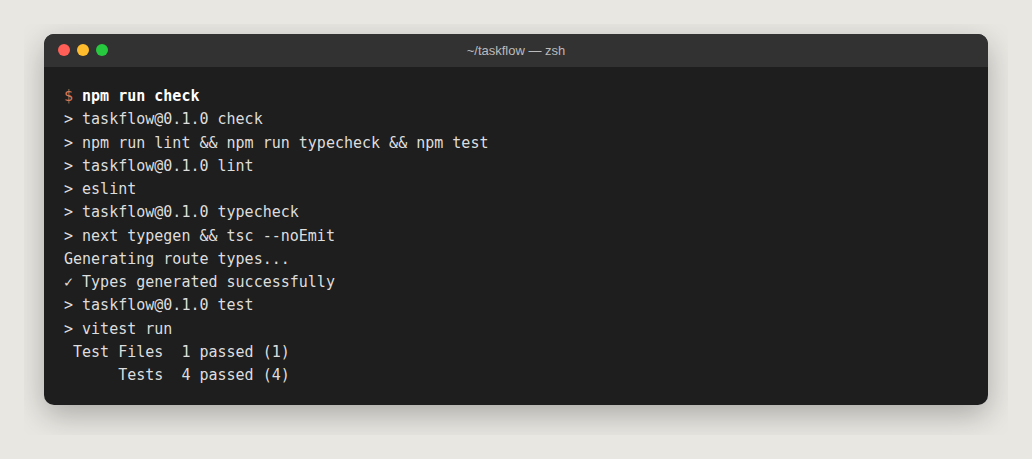
})
11.2 End-to-end tests with Playwright
// playwright.config.ts
import { defineConfig } from "@playwright/test"

export default defineConfig({
  testDir: "e2e",
  use: { baseURL: "http://localhost:3000" },
  webServer: { command: "npm run dev", url: "http://localhost:3000", reuseExistingServer: true },
})
// e2e/home.spec.ts
import { expect, test } from "@playwright/test"
test("landing page shows the waitlist form", async ({ page }) => {
await page.goto("/")
await expect(page.getByRole("heading", { name: "Ship work, not status updates" })).toBeVisible()
await expect(page.getByPlaceholder("Enter your work email")).toBeVisible()
})
test("board redirects signed-out users to login", async ({ page }) => {
await page.goto("/board")
await expect(page).toHaveURL(/\/login/)
})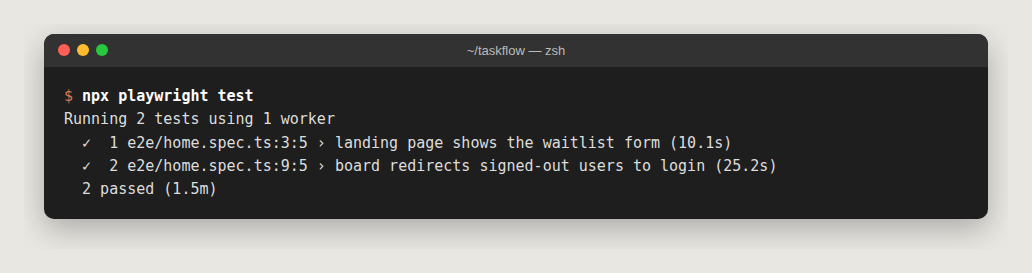
The second test is a security test: it proves proxy.ts keeps signed-out visitors out of the board.
11.3 Permissions and hooks: guardrails that always run
Instructions in CLAUDE.md can be forgotten. Hooks and permission rules in .claude/settings.json can’t, because Claude Code enforces them:
{
  "permissions": {
    "allow": [
      "Bash(npm run lint:*)",
      "Bash(npm run typecheck)",
      "Bash(npm test:*)",
      "Bash(npm run check)",
      "Bash(git status)",
      "Bash(git diff:*)",
      "mcp__vercel__search_vercel_documentation",
      "mcp__vercel__list_deployments",
      "mcp__vercel__get_runtime_logs"
    ],
    "deny": [
      "Read(./.env*)",
      "Bash(vercel --prod:*)",
      "Bash(npx supabase db push:*)"
    ]
  },
  "hooks": {
    "PostToolUse": [
      {
        "matcher": "Edit|Write",
        "hooks": [
          {
            "type": "command",
            "command": "jq -r '.tool_input.file_path' | grep -E '\\.(ts|tsx)$' | xargs -r npx eslint --fix"
          }
        ]
      }
    ]
  }
}- allow: safe, read-only commands run without asking, so you aren’t drowning in prompts.
- deny: Claude can’t read your
.envfiles, deploy to production or push migrations. Those stay your decisions. (jqmust be installed for the hook:brew install jq/sudo apt install jq.) - hook: every time Claude edits a
.ts/.tsxfile, ESLint auto-fixes it.
11.4 CI with GitHub Actions
# .github/workflows/ci.yml
name: CI
on:
  pull_request:
  push:
    branches: [main]
jobs:
  check:
    runs-on: ubuntu-latest
    steps:
      - uses: actions/checkout@v6
      - uses: actions/setup-node@v6
        with:
          node-version: 24
          cache: npm
      - run: npm ci
      - run: npm run check
✅ Checkpoint
npm run check and npm run test:e2e both pass. Commit, create a GitHub repo and push:
git add -A && git commit -m "feat: waitlist, auth, realtime board, tests"
gh repo create taskflow --private --source=. --push
12. Weekly digests with Vercel Cron
Every Monday at 07:00 UTC, each member gets an email summarising what shipped last week.
// vercel.json
{
  "$schema": "https://openapi.vercel.sh/vercel.json",
  "crons": [{ "path": "/api/cron/digest", "schedule": "0 7 * * 1" }]
}
// emails/digest.tsx
import { Body, Container, Heading, Html, Preview, Text } from "react-email"
export default function DigestEmail({ tasks = [{ title: "Example task" }] }: { tasks?: { title: string }[] }) {
return (
<Html>
<Preview>{`${tasks.length} tasks shipped last week`}</Preview>
<Body style={{ fontFamily: "sans-serif", background: "#f6f6fb" }}>
<Container style={{ background: "#fff", padding: 32, borderRadius: 12 }}>
<Heading>Last week in TaskFlow</Heading>
{tasks.map((t, i) => (
<Text key={i}>✅ {t.title}</Text>
))}
</Container>
</Body>
</Html>
)
}// app/api/cron/digest/route.ts
import { Resend } from "resend"
import { supabaseAdmin } from "@/lib/supabase/admin"
import DigestEmail from "@/emails/digest"
export async function GET(request: Request) {
// Vercel sends "Authorization: Bearer <CRON_SECRET>" when CRON_SECRET is set
if (request.headers.get("authorization") !== `Bearer ${process.env.CRON_SECRET}`) {
return new Response("Unauthorized", { status: 401 })
}
const since = new Date(Date.now() - 7 * 24 * 60 * 60 * 1000).toISOString()
const [{ data: done }, { data: members }] = await Promise.all([
supabaseAdmin.from("tasks").select("title, workspace_id").eq("status", "done").gte("updated_at", since),
supabaseAdmin.from("workspace_members").select("workspace_id, user_id"),
])
const emails = []
for (const m of members ?? []) {
const tasks = (done ?? []).filter((t) => t.workspace_id === m.workspace_id)
if (tasks.length === 0) continue
const { data } = await supabaseAdmin.auth.admin.getUserById(m.user_id)
if (!data.user?.email) continue
emails.push({
from: process.env.EMAIL_FROM!,
to: data.user.email,
subject: `${tasks.length} tasks shipped last week`,
react: DigestEmail({ tasks }),
})
}
// Resend's batch endpoint accepts up to 100 emails per call
const resend = new Resend(process.env.RESEND_API_KEY)
for (let i = 0; i < emails.length; i += 100) {
await resend.batch.send(emails.slice(i, i + 100))
}
return Response.json({ sent: emails.length })
}Test it locally without waiting for Monday:
curl -H "Authorization: Bearer $(grep CRON_SECRET .env.local | cut -d= -f2)" \
  http://localhost:3000/api/cron/digest
Vercel runs cron jobs only on production deployments, not previews. At scale, looking users up one by one won’t hold up. Section 16 shows what to do instead.
13. Deploy to Vercel
13.1 First deploy with the CLI
🤖 Ask Claude:
Link this repo to a new Vercel project called taskflow and connect the GitHub
repo. List every variable in .env.example and tell me which ones I need to add
for Production and Preview — I'll paste the values myself. Then create a
preview deployment and check the build logs for warnings.
What happens under the hood (you can also do it yourself):
vercel link                                  # creates/links the project
vercel git connect                           # deploy on every push
vercel env add SUPABASE_SECRET_KEY production   # prompts for the value — repeat per variable
vercel deploy                                # preview deployment
vercel env pull .env.local                   # later: sync dashboard vars back to your machine
Production values differ from local ones: NEXT_PUBLIC_SITE_URL=https://yourdomain.com, real Turnstile keys, a strong CRON_SECRET, and EMAIL_FROM on your verified domain. Mark secrets as Sensitive in the dashboard.
13.2 Add Upstash Redis (rate limiting)
Vercel dashboard → your project → Storage (or Marketplace) → Upstash for Redis → create a free database → connect it to the project. Vercel injects the connection variables automatically. If they arrive under different names than UPSTASH_REDIS_REST_URL / UPSTASH_REDIS_REST_TOKEN, add those two names pointing to the same values.
13.3 Turn on Analytics and Speed Insights
Project → Analytics → Enable, and Speed Insights → Enable. The components are already in the layout, so data starts flowing on the next deploy. The Vercel MCP can query it: “How many visitors hit the landing page this week?”
✅ Checkpoint
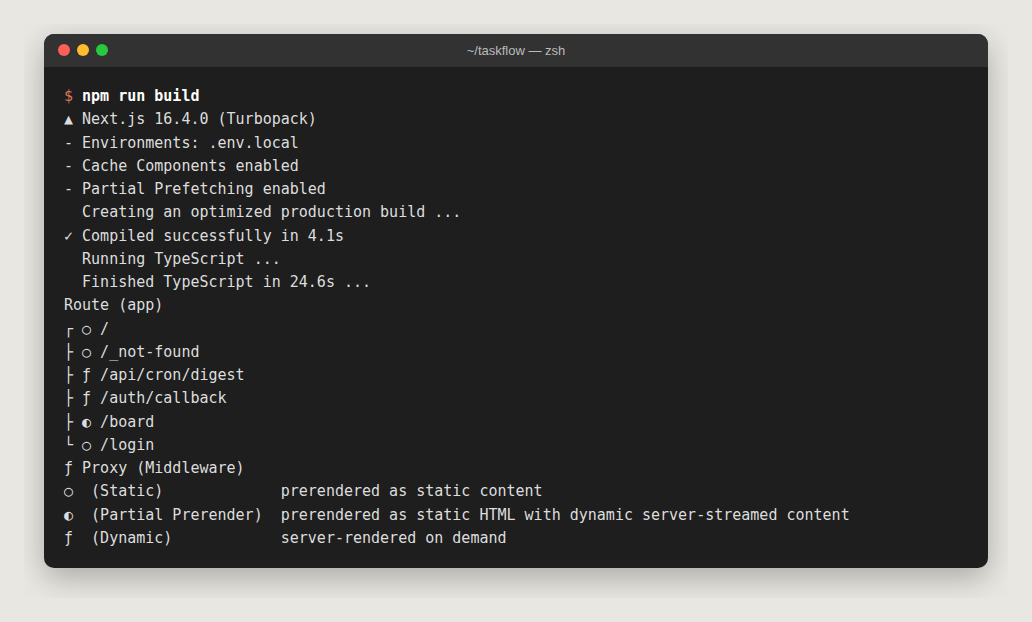
The build log shows the same route table as mine: / and /login static (○), /board partial prerender (◐: static shell plus streamed user data), and the API routes dynamic (ƒ). Your preview URL loads the landing page.
14. Custom domain and email DNS on Cloudflare
Assume your domain yourdomain.com is on Cloudflare.
14.1 Point the app at Vercel
- Vercel: Project → Settings → Domains → Add
yourdomain.comandwww.yourdomain.com. Vercel shows the exact records it wants. - Cloudflare DNS → Records: add them. Typically:
| Type | Name | Content | Proxy |
|---|---|---|---|
| A | @ | the IP Vercel shows | DNS only (grey cloud) |
| CNAME | www | the target Vercel shows | DNS only |
Why grey cloud? Vercel already runs a global CDN and issues your TLS certificate. Putting Cloudflare’s orange-cloud proxy in front adds a second CDN layer that can break certificate renewal and confuse caching. Use Cloudflare for DNS, Turnstile and (optionally) R2/Workers. Let Vercel serve the app.
14.2 Verify your sending domain for Resend
- Resend: Domains → Add Domain. Use a subdomain like
mail.yourdomain.comso your email reputation is isolated. - Resend lists MX, SPF (TXT) and DKIM (TXT) records. Add them in Cloudflare DNS (DNS only).
- Add DMARC:
TXT _dmarc.yourdomain.com "v=DMARC1; p=none; rua=mailto:dmarc@yourdomain.com". Tighten it toquarantineonce reports look clean. - Click Verify, then set
EMAIL_FROM="TaskFlow <hello@mail.yourdomain.com>"in Vercel.
🤖 Ask Claude: “Get the DNS records Resend needs for mail.yourdomain.com and list them for me to add in Cloudflare, then re-check the domain in Resend until it’s verified.” I keep DNS writes manual. A wrong record can take your site or email down, and it’s a 30-second job by hand.
✅ Production checklist
-
NEXT_PUBLIC_SITE_URL=https://yourdomain.comon Vercel - Supabase Auth → URL Configuration: production Site URL and
/auth/callbackredirect added - Real Turnstile keys, and the widget’s hostnames include
yourdomain.com - Resend domain verified,
EMAIL_FROMuses it, and Supabase SMTP points at Resend -
CRON_SECRETset, and the cron is visible under Project → Settings → Cron Jobs - Upstash connected (rate limiting active)
-
npm run checkgreen onmain
15. The everyday agentic loop (and Claude on GitHub)
15.1 Feature loop on your machine
> Create a branch feat/task-comments. Plan first: comments on tasks with RLS
  (members of the workspace only), a migration, server actions, UI, and tests.
Claude plans (you correct the plan), writes the migration and code, runs npm run check, opens a PR with gh, waits for the Vercel preview, then uses Vercel MCP tools (list_deployments, get_deployment, get_runtime_logs) to confirm the preview is healthy. You review the diff and the preview, then merge. Vercel ships to production.
When production breaks:
> Users report the board is empty since the last deploy. Check Vercel runtime
  errors for the last hour, correlate with the latest deployment, and find the cause.
Roll back first (Vercel Instant Rollback), then debug.
15.2 Claude on GitHub: @claude in issues and PRs
Inside claude, run:
/install-github-appIt installs the Claude GitHub App, stores a secret (ANTHROPIC_API_KEY, or CLAUDE_CODE_OAUTH_TOKEN for a subscription) and opens a PR adding .github/workflows/claude.yml. Merge it. Now anyone with write access can comment on an issue or PR:
@claude implement this issue — follow CLAUDE.md, add tests, open a PR
@claude why does this PR fail CI?
The workflow it installs looks like this (anthropics/claude-code-action@v1):
name: Claude Code
on:
  issue_comment:
    types: [created]
  pull_request_review_comment:
    types: [created]
jobs:
  claude:
    if: contains(github.event.comment.body, '@claude')
    runs-on: ubuntu-latest
    permissions:
      contents: write
      pull-requests: write
      issues: write
      id-token: write
      actions: read
    steps:
      - uses: actions/checkout@v6
        with:
          fetch-depth: 1
      - uses: anthropics/claude-code-action@v1
        with:
          anthropic_api_key: ${{ secrets.ANTHROPIC_API_KEY }}
15.3 Habits that make agents effective
- Plan before acting.
Shift+Tabinto plan mode for anything non-trivial. Correcting a plan is far cheaper than correcting code. - One task per context.
/clearbetween unrelated tasks. - Give it a way to verify. Tests, type-checks, a dev server, logs over MCP. The better the checks, the bigger the tasks you can delegate.
- Encode lessons. Repeated corrections go in
CLAUDE.md; must-never-happen rules go in.claude/settings.json. - Parallelise with git worktrees for independent tasks: one session on the board, another on emails, each on its own branch.
- Review like it’s a teammate’s PR. Read the diff, and check that the tests actually test something. You’re accountable for what ships.
- Secrets never go in chat.
16. Scaling up: from demo to production
Here is what changes when TaskFlow needs to serve thousands of teams, with the prompts I use for each.
Database
- Advisors on every schema change: “Run Supabase performance and security advisors and fix findings.”
- Index what RLS uses. Every column in a policy (
workspace_id,user_id) needs an index. Wrapauth.uid()and helpers as(select …)so Postgres evaluates them once per query. The migration above already does both. - Use the connection pooler (Supavisor, transaction mode, port 6543) for anything serverless that connects to Postgres directly.
- Keyset pagination for big boards (
where position > $last order by position limit 100), notoffset. - Separate environments: one Supabase project for dev and one for production, or Supabase branching so each PR gets its own database. Migrations are applied by CI, not by hand.
App and edge
- Keep the static parts static. Cache Components already prerenders
/and/login. Use"use cache"for data that changes rarely. - Rate-limit everything public: waitlist (done), magic-link requests and any API route. Add Vercel Firewall rules for abusive IPs.
- Keep regions close. Pin Vercel function regions near your Supabase region.
- Files go to object storage. Task attachments go in Supabase Storage or Cloudflare R2 via signed upload URLs, never through a function.
Background work
- Move the digest and other slow jobs (exports, imports, webhooks) to a queue or durable workflow. Store each member’s email in a
profilestable instead of calling the Auth admin API per user. - Make jobs idempotent (e.g. a
digest_sent_atper member per week) so retries never double-send. - Handle Resend webhooks (
email.bounced,email.complained) and stop mailing those addresses.
Observability
- Vercel Analytics + Speed Insights (done), log drains, and Supabase’s log explorer.
- Error tracking:
npx @sentry/wizard@latest -i nextjssets up Sentry in a few prompts. - Feature flags and preview → promote (or rolling releases) for risky changes.
- Run Claude Code’s
/security-reviewon PRs that touch auth, RLS or payments.
🤖 One prompt that is surprisingly effective once you’re live:
Act as an SRE. Using Vercel runtime logs, Supabase advisors and query
performance, list the top 5 risks to TaskFlow at 100x current traffic,
with evidence for each, ordered by impact. Don't change anything yet.
17. Troubleshooting
Every row marked ⚡ is something I actually hit while re-testing this article.
| Symptom | Cause | Fix |
|---|---|---|
⚡ npm fails with ENOSPC, or random ERESOLVE dependency errors | Disk full | Free space (npm cache clean --force), delete node_modules and the lockfile, reinstall |
| ⚡ npm hangs forever after “added N packages” | npm audit network call stuck | Ctrl+C. Use npm install --no-audit; the packages are already installed |
⚡ ERESOLVE … While resolving: vitest … @types/node@20 | Vitest 5 needs newer Node types | npm i -D @types/node@24 |
⚡ Cannot find name 'LayoutProps' | Route types not generated | Use next typegen && tsc --noEmit |
| ⚡ Build error: “uncached or runtime data during prerendering” | Cache Components + cookies read outside <Suspense> | Move the data-reading part into a child component wrapped in <Suspense> (section 10.3) |
⚡ Page renders in a serif font after shadcn init | Font variable mismatch | Set Geist variable: "--font-sans" in app/layout.tsx |
| ⚡ Stitch call times out | Generation outlives the tool call | Poll the project (list_screens/get_project), or retry once with the faster model |
Deprecation warning for @react-email/components | Package retired | npm uninstall @react-email/components && npm i react-email, import from "react-email" |
zod warns string().email() is deprecated | zod v4 | z.email(), z.uuid(), z.url() |
/mcp shows failed / needs authentication | OAuth missing or expired | Select it in /mcp and log in again. For Stitch, check the API-key env var is set in the shell that launched claude |
| Supabase MCP refuses to write | read_only=true | Intended. Use migrations + supabase db push instead |
| Board is empty though data exists | RLS mismatch | Test as two users (section 8.3 checkpoint); check the workspace_members rows |
| Magic link opens localhost in production | Auth URLs not updated | Supabase Auth → URL Configuration + NEXT_PUBLIC_SITE_URL |
| Resend: “You can only send testing emails to your own email address” | Domain not verified | Section 14.2 |
| Domain shows Invalid Configuration on Vercel | Orange-cloud proxy or wrong record | DNS only, matching exactly what Vercel shows |
| Cron returns 401 | CRON_SECRET missing | Add it in Vercel and redeploy |
| Realtime events never arrive | Table not in publication, or RLS blocks select | alter publication supabase_realtime add table …, then check the select policy |
claude: command not found after install | Install dir not on PATH | Open a new terminal; run claude doctor |
18. Glossary
- Agent: an AI that can take actions (run commands, edit files, call tools) in a loop until a goal is met, not just answer questions.
- MCP (Model Context Protocol): an open standard for exposing tools to AI agents. An MCP server is one service’s set of tools.
- OAuth: “log in with…” style authorization. MCP servers use it so you never paste passwords into the agent.
- RLS (Row-Level Security): Postgres rules that decide which rows each user can see or change. Your real security boundary.
- Migration: a versioned SQL file that changes the database schema, stored in Git.
- Server Action: a server function you can call from a form or component in Next.js.
- Cache Components / Partial Prerendering: Next.js 16 prerenders a static shell of each page and streams the dynamic, per-user parts inside
<Suspense>. - Preview deployment: a unique URL Vercel builds for every branch or PR.
- Turnstile: Cloudflare’s free, privacy-friendly CAPTCHA alternative.
- Idempotent: safe to run twice. Retrying an idempotent job doesn’t duplicate its effect.
Conclusion
The point of an agentic workflow is not that the AI writes the code. It is that the whole loop runs in one place: design, code, database, tests, deploy, email, DNS and logs. Your role moves from operator to reviewer and decision-maker. MCP makes the loop possible. Plan mode, a good CLAUDE.md, enforced permissions and hooks, and real tests make it safe.
Re-testing this guide also proved something: the ecosystem moves fast. In a few months a popular email package was retired, zod changed its API, and Next.js turned on a new rendering model by default. An agent with live access to docs (Vercel MCP’s documentation search, Cloudflare’s docs server, the Vercel plugin’s skills) plus a test suite that catches breakage is how you keep up without reading every changelog yourself.
Start small. Connect one MCP server to a project you already have, maybe Vercel for logs or Supabase in read-only mode, and ask Claude a question you’d normally answer by clicking through a dashboard. Once you see it answer with real data from your own stack, it’s hard to go back.
The full code is in the taskflow-agentic-starter repo. Clone it, run claude, and start from there.
If you build something with this workflow, share it with us at BOSC. We’d love to see it, and to help if you get stuck. Happy shipping! 🚀